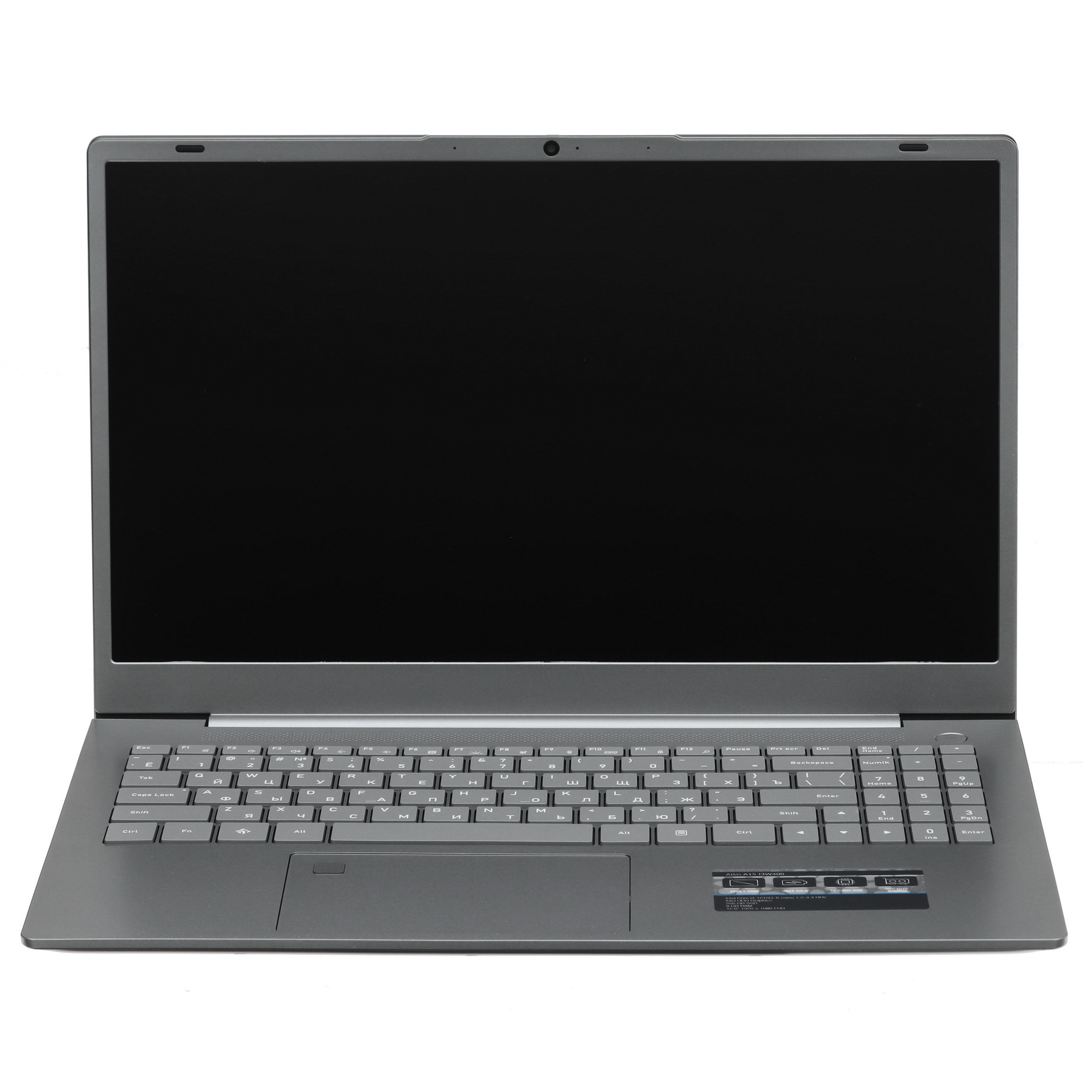
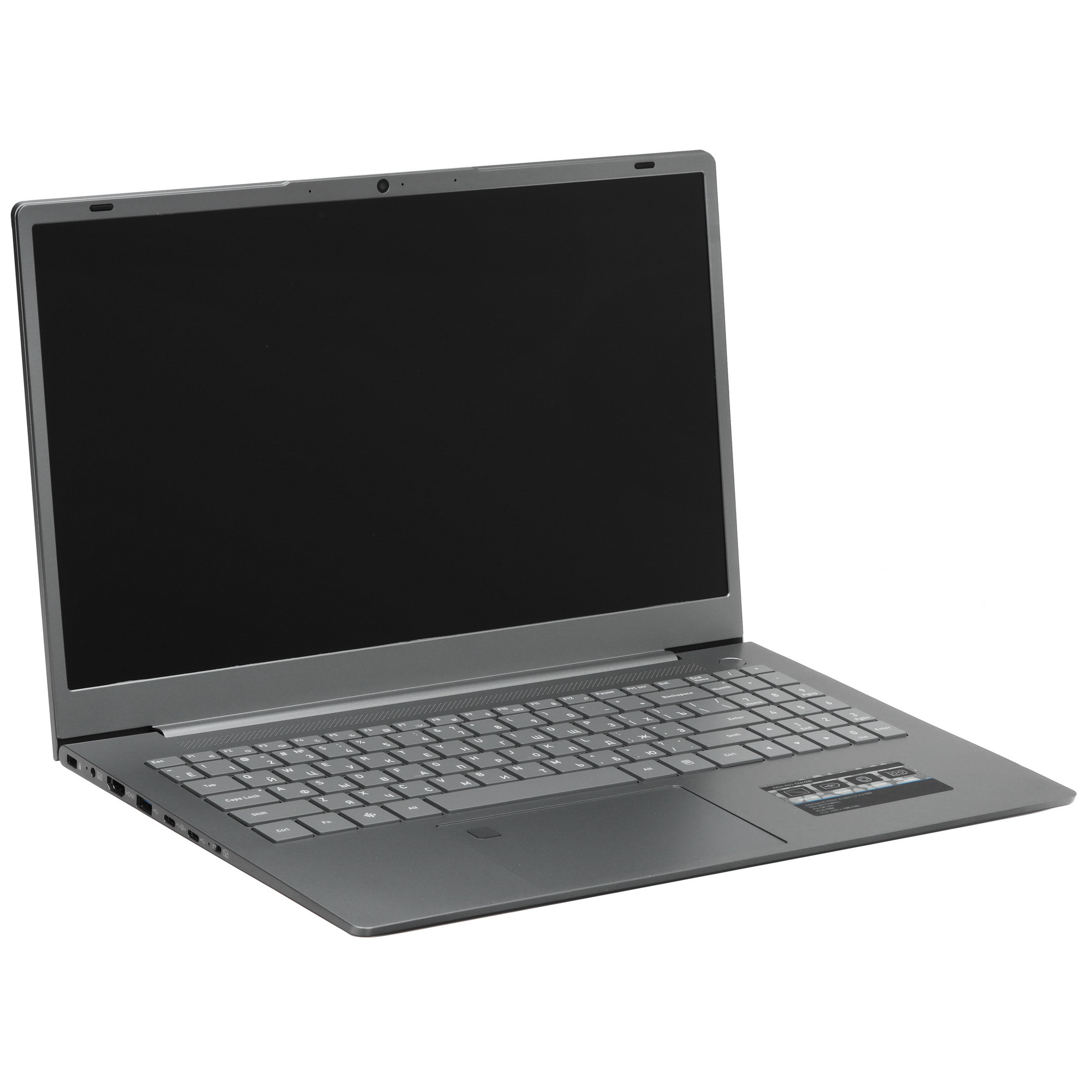
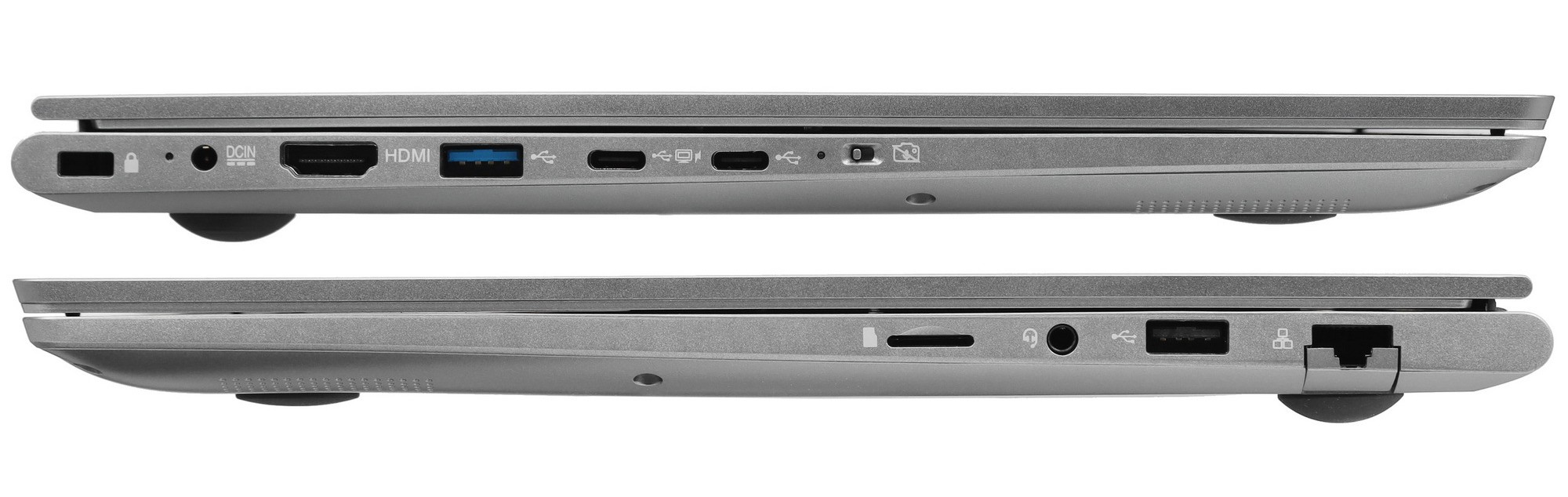
The laptop was purchased at DNS-Vladivostok (26,000 rubles, ≈ 325 USD) to replace a 13-year-old DNS Office 15.6" laptop (Core i3, 2048 MB, 320 GB). Over the past 13 years, the previous laptop had been improved with 8 GB of RAM in total and the hard drive had been upgraded to a 2 TB one. Therefore, an additional 16 GB memory module was purchased for the new laptop, bringing the total to 24 GB. The SSD drive was also upgraded to a 2 TB NVMe SSD. All in all, the price became to 44,000 rubles, ≈ 550 USD.
Manufacturer's data
Seller's warranty
12 months
Service life
24 months
Country of Origin
China
Classification
Type
Laptop
Model
DEXP Atlas A15-I3W400
Line
DEXP Atlas
Manufacturer Code
[A15-I3W400]
Release Year
2025
Gaming Laptop
No
Operating System
Operating System
Windows 11 Home
Appearance
Design
Classic
Top Lid Color
Silver
Manufacturer's Declared Color
Silver
Lid Material
Aluminum
Body Material
Plastic
Lid Opening
Standard
Input Devices
Keyboard Layout
English/Russian
Numeric Keypad
Yes
Key Backlight
Single-Color (White)
Touchpad
Standard Touchpad
Fingerprint Scanner
Yes
Mechanical Keyboard
No
Spill-Resistant Keyboard
No
Screen
Type Screen
IPS
Screen diagonal (inches)
15.6"
Screen Resolution
1920x1080
Screen Finish
Matte
Touch Screen
No
Maximum Refresh Rate
60 Hz
Brightness
300 cd/m²
Pixel Density
141 ppi
Dynamic Screen Refresh Technology
No
Color Gamut
45% NTSC
HDR
No
Secondary Display
No
Processor
Processor Model
Intel Core i3-1215U
Total Number of Cores
6
Number of Performance Cores
2
Number of Power-Efficient Cores
4
Number of Small Power-Efficient Cores
0
Maximum Number of Threads
8
Base Frequency of Performance Cores
1.2 GHz
Maximum Frequency of Performance Cores
4.4 GHz
Base Frequency of Power-Efficient Cores
0.9 GHz
Maximum Frequency of Power-Efficient Cores
3.3 GHz
Base TDP
15 W
Processor Generation
Intel 12th Generation
Technology
Intel 7
Neural Processor
yes
RAM
RAM Type
DDR4
RAM Capacity
8 GB
Number of Memory Slots
2
RAM Frequency
3200 MHz
Maximum Memory
64 GB
Available RAM Slots
1
Graphics Accelerator
Graphics Accelerator Type
Integrated
Integrated Graphics Card Model
Intel UHD Graphics
Discrete Graphics Card Model
no
Storage
Total Solid-State Drive (SSD) Capacity
256 GB
SSD Drive Type
M.2 PCIe
Integrated Memory Capacity
0 GB
Available Storage Slots
M.2 SATA
Webcam
Webcam
2 MP (1080p)
Face Recognition
no
Webcam Shutter
no
Integrated Accessories
Integrated Speakers
yes
Speaker Power
2 x 2 W
Built-in Microphone
yes
Number of Microphones
1 pc
Memory Card Reader
microSD
Sensors
no
Internet/Data Transfer
Wireless Interface
Bluetooth 5.0, Wi-Fi 5 (802.11ac)
Ethernet Port
LAN 1 Gbps
Peripheral Ports
Video Ports
HDMI, USB Type-C
Video Port Version
HDMI 1.4
Audio Ports
3.5 mm jack (microphone/audio)
USB Type-A Ports
USB 2.0, USB 3.2 Gen1
USB Type-C Ports
2 x USB 3.2 Gen1
Thunderbolt
no
Power
USB Power Delivery Support
yes
Battery Type
Li-Pol
Capacity Battery
55 Wh
Battery Capacity
4825 mAh
Approximate Battery Life
8 h
Power Adapter Output
45 W
Additional Information
Additional
Camera Lock, Kensington Lock
Package Included
Power Adapter, Documentation
Dimensions and Weight
Width
360.8 mm
Depth
235.3 mm
Thickness
18.1 mm
Weight
1.91 kg
I used Gentoo Linux on my previous laptop after purchasing it, then switched to Calculate Linux. After purchasing a new laptop, I decided to install Calculate Linux on it as well, but after installation, the sound card and X11 didn't work—the graphics settings was not autodetected. The graphics issues also persist when booting from the Live DVD. Maybe I'll write how to install Calculate Linux later, but for now I've decided to return to Gentoo Linux—thankfully, the package management and build system, Portage, is the same on both distributions😁.
First, I'm installing Windows 11 for programs that aren't available on Linux, as well as for games. I'm disabling Secure Boot—it adds unnecessary complexity during installation, and I don't really see any advantages for me. During installation, I created an EFI partition (FAT32 100 MB), Microsoft Reserved Partition (16 MB), a Windows system partition (NTFS 250 GB), and a Windows data partition (NTFS 320 GB). I created these partitions from the Windows installation flash drive. We'll do the rest of the partitioning from the Gentoo Linux installation flash drive.
Windows installation went smoothly. After installation, we installed the drivers posted on the DNS website. Also I publish drivers on Github if you have trouble with access to DNS site. Everything worked fine.
Next, download the LiveGUI USB Image disk image for the AMD64 architecture and immediately download the Stage3 archive for the desktop profile | openrc profile.
To prepare a bootable USB flash drive in Linux, use the command:
dd if=full_path_to_iso_file of=full_path_to_USB_flash_drive bs=4096 status=progress && syncTo prepare a bootable USB flash drive in Windows, you can use Rufus or Ventoy.
To boot from a USB drive, after pressing the power button, hold down the Esc or Del key to enter the BIOS. Then, in the BIOS, select the Save & Exit tab and select the desired drive in the Boot Override section. Press Enter, and the LiveGUI USB will boot.
Note: It's recommended to use an external mouse for installation, as kernel versions including 6.17.7 disable the touchpad after a short period from booting. A kernel module will be installed to fix this issue. It's possible that the kernel will be patched in the future, making the module unnecessary.
KDE is used as the desktop environment of LiveUSB, so there shouldn't be any dificulties during work. Initially, setting up a WiFi network via the NetworkManager applet in the taskbar didn't work — the connection hung during the authorization process. We manually configured the WiFi security type to WPA/WPA2 Personal. We also specified that passwords should be saved for all users (no encryption). After reboot, we'll have to set up the network again.
It's important to set the correct system time, as the time must match when synchronizing the repository. Time is specified in UTC (MM = month, DD = day, hh = hour, mm = minutes, YYYY = year).
root # date MMDDhhmmYYYYWe partition the unallocated portion of the disk using KDE Partitition Manager or GParted. I split the remaining disk in half—one partition for the root drive and one for shared data. I don't use the recommended method of mounting individual folders on separate partitions—I'm the only one using the laptop. I use ext3 as the file system, although any other recommended file system (XFS, ext4, btrfs, or ZFS) will work. I didn't create a swap partition because I expanded the RAM to 24 GB.
As a result, I received the following NVMe disk partititions:
root # fdisk /dev/nvme0n1

Welcome to fdisk (util-linux 2.41.2).
Changes will remain in memory only, until you decide to write them.
Be careful before using the write command.

This disk is currently in use - repartitioning is probably a bad idea.
It's recommended to umount all file systems, and swapoff all swap
partitions on this disk.


Command (m for help): p

Disk /dev/nvme0n1: 1,86 TiB, 2048408248320 bytes, 4000797360 sectors
Disk model: ADATA LEGEND 700
Units: sectors of 1 * 512 = 512 bytes
Sector size (logical/physical): 512 bytes / 512 bytes
I/O size (minimum/optimal): 512 bytes / 512 bytes
Disklabel type: gpt
Disk identifier: XXXXXXXX-XXXX-XXXX-XXXX-XXXXXXXXXXXX

Device              Start        End    Sectors   Size Type
/dev/nvme0n1p1       2048     206847     204800   100M EFI System
/dev/nvme0n1p2     206848     239615      32768    16M Microsoft reserved
/dev/nvme0n1p3     239616  523294719  523055104 249,4G Microsoft basic data
/dev/nvme0n1p4  523294720 1201180671  677885952 323,2G Microsoft basic data
/dev/nvme0n1p5 1201180672 2593820671 1392640000 664,1G Linux filesystem
/dev/nvme0n1p6 2593820672 4000796671 1406976000 670,9G Linux filesystem

Command (m for help): q
For further installation, we'll use the /dev/nvme0n1p5 partition. Let's create a mount point for our partition:
root # mkdir --parents /mnt/gentooWe mount our partition to the mount point:
root # mount /dev/nvme0n1p5 /mnt/gentooDownload the stage3 file or find the previously downloaded file. To download:
root # links https://www.gentoo.org/downloads/mirrors/Next, you need to extract this file to the partition designated for installation. To do this, run the following command from the folder where you download the stage3 file:
root # tar xpvf stage3-*.tar.xz --xattrs-include='*.*' --numeric-owner -C /mnt/gentooAfter unpacking, edit the build parameters in the make.conf file:
root # nano /mnt/gentoo/etc/portage/make.confIn my case, make.conf looks something like this.
# These settings were set by the catalyst build script that automatically
# built this stage.
# Please consult /usr/share/portage/config/make.conf.example for a more
# detailed example.
# Variable COMMON_FLAGS is needed determine. In other case compilation of package gcc will be interrupted with error.
COMMON_FLAGS="-O2 -pipe -march=alderlake -mabm -mno-kl -mno-pconfig -mno-sgx -mno-widekl -mshstk --param=l1-cache-line-size=64 --param=l1-cache-size=32 --param=l2-cache-size=10240"
CFLAGS="${COMMON_FLAGS}"
CXXFLAGS="${COMMON_FLAGS}"
FCFLAGS="${COMMON_FLAGS}"
FFLAGS="${COMMON_FLAGS}"
MAKEOPTS="-j3"
# Flag -getbinpkg mean that packages will be compiled from source code. If you want use precompiled binary packages it needed comment line FEATURES with #.
FEATURES="${FEATURES} -getbinpkg"
ACCEPT_LICENSE="*"

USE="abi_x86_64 abi_x86_32 emoji ibus heif mng xpm uils tools dc1394 dts faad -minimal whatsapp irc btpclient deprecated experimental extra-tools test-programs fontforge utils lzma plasma alsa-plugin sqlite maps pulseaudio python wep wps fontforge utils lz4 lzma webp dec265 enc265 gtk kde glx plasma plugins tools utils extra icons gui offlinehelp postgres icu  blender video zeroconf firmware lcms extras mp3rtp sndfile rar rrsync stunnel cookie-check metalink fonts odbc http https nmea flite pixeltool qdoc qmlls qtdiag qtplugininfo appindicator kwallet webengine activities geolocation cryptsetup X evdev ffmpeg fftw opengl rav1e svt-av1 avif iptables doh geoip keyutils conntrack dhcp-tools libidn2 http2 geoip2 fuse mount-ntfs ntfsdecrypt ru-dv ru-i ru-k lzip libssh2 ncat ndiff nping zenmap gsm iec61883 ieee1394 jpegxl ladspa librtmp modplug qrcode samba ssh zimg dvb javascript resolvconf positioning aptx ldac mpg123 epub markdown mobi zip quicktime mtp sddm clang kerberos corefonts libusb0 amrenc twolame pcap lspclient websockets animgif wifi tray wayland-compositor xwayland curl programs androiddump ciscodump http3 sshdump libusb mqtt gimp dia midi svg2 websocket pipewire-alsa sound-server"
GPSD_PROTOCOLS="nmea0183"
L10N="en en-US ru"
CPU_FLAGS_X86="aes avx avx2 avx_vnni bmi1 bmi2 f16c fma3 mmx mmxext pclmul popcnt rdrand sha sse sse2 sse3 sse4_1 sse4_2 ssse3 vpclmulqdq"
INPUT_DEVICES="libinput evdev synaptics"

# NOTE: This stage was built with the bindist USE flag enabled

# This sets the language of build output to English.
# Please keep this setting intact when reporting bugs.
LC_MESSAGES=C.UTF-8
Next, to update and install packages, you need to transfer information about domain name servers (DNS) to the installation partition:
root # cp --dereference /etc/resolv.conf /mnt/gentoo/etc/
All preparatory steps are complete – let's go to the chroot environment of our partition in the terminal to install the system:
root # arch-chroot /mnt/gentoo
Let's prepare for installing the grub bootloader:
root # mkdir --parents /boot/efi
root # mount /dev/nvme0n1p1 /boot/efi
Install a snapshot of the portage repository on the system:
root # emerge-webrsync
root # emerge --sync
After completing the commands, you need to select a system profile:
root # eselect profile list
Available profile symlink targets:
  [1]   default/linux/amd64/23.0 (stable)
  [2]   default/linux/amd64/23.0/systemd (stable)
  [3]   default/linux/amd64/23.0/desktop (stable)
  [4]   default/linux/amd64/23.0/desktop/systemd (stable)
  [5]   default/linux/amd64/23.0/desktop/gnome (stable)
  [6]   default/linux/amd64/23.0/desktop/gnome/systemd (stable)
  [7]   default/linux/amd64/23.0/desktop/plasma (stable) *
  [8]   default/linux/amd64/23.0/desktop/plasma/systemd (stable)
  [9]   default/linux/amd64/23.0/no-multilib (stable)
  [10]  default/linux/amd64/23.0/no-multilib/systemd (stable)
  [11]  default/linux/amd64/23.0/no-multilib/hardened (stable)
  [12]  default/linux/amd64/23.0/no-multilib/hardened/systemd (stable)
  [13]  default/linux/amd64/23.0/no-multilib/hardened/selinux (stable)
  [14]  default/linux/amd64/23.0/no-multilib/hardened/selinux/systemd (stable)
  [15]  default/linux/amd64/23.0/no-multilib/prefix (exp)
  [16]  default/linux/amd64/23.0/no-multilib/prefix/kernel-2.6.32+ (exp)
  [17]  default/linux/amd64/23.0/no-multilib/prefix/kernel-2.6.16+ (exp)
  [18]  default/linux/amd64/23.0/no-multilib/prefix/kernel-3.2+ (exp)
  [19]  default/linux/amd64/23.0/llvm (exp)
  [20]  default/linux/amd64/23.0/llvm/systemd (exp)
  [21]  default/linux/amd64/23.0/hardened (stable)
  [22]  default/linux/amd64/23.0/hardened/systemd (stable)
  [23]  default/linux/amd64/23.0/hardened/selinux (stable)
  [24]  default/linux/amd64/23.0/hardened/selinux/systemd (stable)
  [25]  default/linux/amd64/23.0/split-usr (stable)
  [26]  default/linux/amd64/23.0/split-usr/desktop (stable)
  [27]  default/linux/amd64/23.0/split-usr/desktop/gnome (stable)
  [28]  default/linux/amd64/23.0/split-usr/desktop/plasma (stable)
  [29]  default/linux/amd64/23.0/split-usr/no-multilib (stable)
  [30]  default/linux/amd64/23.0/split-usr/no-multilib/selinux (stable)
  [31]  default/linux/amd64/23.0/split-usr/no-multilib/hardened (stable)
  [32]  default/linux/amd64/23.0/split-usr/no-multilib/hardened/selinux (stable)
  [33]  default/linux/amd64/23.0/split-usr/no-multilib/prefix (exp)
  [34]  default/linux/amd64/23.0/split-usr/no-multilib/prefix/kernel-2.6.32+ (exp)
  [35]  default/linux/amd64/23.0/split-usr/no-multilib/prefix/kernel-2.6.16+ (exp)
  [36]  default/linux/amd64/23.0/split-usr/no-multilib/prefix/kernel-3.2+ (exp)
  [37]  default/linux/amd64/23.0/split-usr/llvm (exp)
  [38]  default/linux/amd64/23.0/split-usr/hardened (stable)
  [39]  default/linux/amd64/23.0/split-usr/hardened/selinux (stable)
  [40]  default/linux/amd64/23.0/x32 (dev)
  [41]  default/linux/amd64/23.0/x32/systemd (exp)
  [42]  default/linux/amd64/23.0/split-usr/x32 (exp)
  [43]  default/linux/amd64/23.0/musl (dev)
  [44]  default/linux/amd64/23.0/musl/llvm (exp)
  [45]  default/linux/amd64/23.0/musl/hardened (exp)
  [46]  default/linux/amd64/23.0/musl/hardened/selinux (exp)
  [47]  default/linux/amd64/23.0/split-usr/musl (dev)
  [48]  default/linux/amd64/23.0/split-usr/musl/llvm (exp)
  [49]  default/linux/amd64/23.0/split-usr/musl/hardened (exp)
  [50]  default/linux/amd64/23.0/split-usr/musl/hardened/selinux (exp)
I use the Plasma(KDE) environment with the OpenRC init system:
root # eselect profiles set 7
Select the locale settings you want to install:
root # nano /etc/locale.gen
In the file that opens, delete the # sign at the beginning of the ru_RU.UTF-8 UTF-8 line. After saving and closing the file, run the command:
root # locale-gen
Configuring video card selection:
root # touch /etc/portage/package.use/00video ; echo '*/* VIDEO_CARDS: -* intel' > /etc/portage/package.use/00video
Next, we update the installed packages:
root # emerge -avuDU @world
Before installation, the command will display a list of packages to be updated with their USE flags. Review the packages scheduled for installation and, if necessary, adjust the installation flags - cancel the installation. You can change the installation flags either in the make.conf file or directly when entering the command:
root # USE="flag_to_install_1 flag_to_install_2 .... -flag_to_rejection_1 -flag_to_rejection_2 ..." emerge -avuDU @world
Once we're satisfied with the flag combination, we agree to the installation and wait for it to complete (it may take a long time). You can also change the flags later after the system installation by rebuilding the packages.
It's also a good idea to download the packages before starting the installation. To do this, run the command:
root # USE="flag_to_install_1 flag_to_install_2 .... -flag_to_rejection_1 -flag_to_rejection_2 ..." emerge -fvuDU @world
And then the installation command.
First, you need to install the required packages.
root # USE="grub initramfs split-ucode redistributable tools device-mapper fonts nls sdl themes truetype dracut mount" emerge -av grub linux-firmware sof-firmware intel-microcode installkernel os-prober
Adding a search for other systems on the disk when configuring grub:
root # nano /etc/default/grub
We insert the following line into the file:
GRUB_DISABLE_OS_PROBER=falseSave and exit.
Next you need to install the kernel:
root # USE="experimental initramfs strip" emerge -pvNU gentoo-kernel
We are waiting for the installation to complete.
First, let's configure how hard drive partitions are mounted after the computer boots. To do this, edit the /etc/fstab file, but first create mount points in the /mnt folder and check the partition names.
root # mkdir /mnt/windows             #system partition Windows
root # mkdir /mnt/windata                        #data partition Windows
root # mkdir /mnt/data                           #data partition Linux
root # fdisk -l /dev/nvme0n1
Disk /dev/nvme0n1: 1,86 TiB, 2048408248320 bytes, 4000797360 sectors
Disk model: ADATA LEGEND 700
Units: sectors of 1 * 512 = 512 bytes
Sector size (logical/physical): 512 bytes / 512 bytes
I/O size (minimum/optimal): 512 bytes / 512 bytes
Disklabel type: gpt
Disk identifier: XXXXXXXX-XXXX-XXXX-XXXX-XXXXXXXXXXXX

Device              Start        End    Sectors   Size Type
/dev/nvme0n1p1       2048     206847     204800   100M EFI System				#EFI partition
/dev/nvme0n1p2     206848     239615      32768    16M Microsoft reserved
/dev/nvme0n1p3     239616  523294719  523055104 249,4G Microsoft basic data		#system partition Windows
/dev/nvme0n1p4  523294720 1201180671  677885952 323,2G Microsoft basic data		#data partition Windows
/dev/nvme0n1p5 1201180672 2593820671 1392640000 664,1G Linux filesystem
/dev/nvme0n1p6 2593820672 4000796671 1406976000 670,9G Linux filesystem			#data partition Linux
Edit the /etc/fstab file:
root # nano /etc/fstab
In my case the file contents are as follows:
# / was on /dev/nvme0n1p5 during installation
/dev/nvme0n1p5  /               ext3    noatime                 0 1
# /boot/efi was on /dev/nvme0n1p1 during installation
/dev/nvme0n1p1  /boot/efi       vfat    noatime                 0 0

/dev/nvme0n1p6  /mnt/data       ext3    noatime,user,exec,rw    0 2

/dev/nvme0n1p3  /mnt/windows    ntfs    noatime,umask=0,rw,exec 0 3
/dev/nvme0n1p4  /mnt/windata    ntfs    noatime,umask=0,rw,exec 0 4

proc            /proc           proc    defaults                0 0
shm             /dev/shm        tmpfs   nodev,nosuid,noexec     0 0
Save and exit (Ctrl+O Enter Ctrl+X).
We set the computer (host) name.
root # echo gentoo > /etc/hostname
Next, we correct the hosts file:
root # nano /etc/hosts
# /etc/hosts: Local Host Database
#
# This file describes a number of aliases-to-address mappings for the for
# local hosts that share this file.
#
# The format of lines in this file is:
#
# IP_ADDRESS    canonical_hostname      [aliases...]
#
#The fields can be separated by any number of spaces or tabs.
#
# In the presence of the domain name service or NIS, this file may not be
# consulted at all; see /etc/host.conf for the resolution order.
#

# IPv4 and IPv6 localhost aliases
127.0.0.1       localhost gentoo
::1             localhost gentoo

#
# Imaginary network.
#10.0.0.2               myname
#10.0.0.3               myfriend
#
# According to RFC 1918, you can use the following IP networks for private
# nets which will never be connected to the Internet:
#
#       10.0.0.0        -   10.255.255.255
#       172.16.0.0      -   172.31.255.255
#       192.168.0.0     -   192.168.255.255
#
# In case you want to be able to connect directly to the Internet (i.e. not
# behind a NAT, ADSL router, etc...), you need real official assigned
# numbers.  Do not try to invent your own network numbers but instead get one
# from your network provider (if any) or from your regional registry (ARIN,
# APNIC, LACNIC, RIPE NCC, or AfriNIC.)
#
Save and exit (Ctrl+O Enter Ctrl+X).
Setting a password for the root user.
root # passwd
After rebooting, a user account will be created for usual works. We'll install additional packages for Russian console fonts and networking.
root # emerge -av terminus-font networkmanager iw wpa_supplicant ntfs3g e2fsprogs bash-completion
After installation is complete, edit the boot service settings.
root # nano /etc/rc.conf
root # nano /etc/conf.d/hwclock
root # nano /etc/conf.d/keymaps
root # nano /etc/conf.d/consolefont
My file contents:
# Global OpenRC configuration settings

# Set to "YES" if you want the rc system to try and start services
# in parallel for a slight speed improvement. When running in parallel we
# prefix the service output with its name as the output will get
# jumbled up.
# WARNING: whilst we have improved parallel, it can still potentially lock
# the boot process. Don't file bugs about this unless you can supply
# patches that fix it without breaking other things!
rc_parallel="NO"

# Set rc_interactive to "YES" and you'll be able to press the I key during
# boot so you can choose to start specific services. Set to "NO" to disable
# this feature. This feature is automatically disabled if rc_parallel is
# set to YES.
rc_interactive="YES"

# Set to "NO" if you don't want pam_openrc autostarting user services. This
# effectively disables the pam module, without the need of removing it from
# the pam configuration files.
#rc_autostart_user="YES"

# If we need to drop to a shell, you can specify it here.
# If not specified we use $SHELL, otherwise the one specified in /etc/passwd,
# otherwise /bin/sh
# Linux users could specify /sbin/sulogin
rc_shell=/sbin/sulogin

# Do we allow any started service in the runlevel to satisfy the dependency
# or do we want all of them regardless of state? For example, if net.eth0
# and net.eth1 are in the default runlevel then with rc_depend_strict="NO"
# both will be started, but services that depend on 'net' will work if either
# one comes up. With rc_depend_strict="YES" we would require them both to
# come up.
#rc_depend_strict="YES"

# rc_hotplug controls which services we allow to be hotplugged.
# A hotplugged service is one started by a dynamic dev manager when a matching
# hardware device is found.
# Hotplugged services appear in the "hotplugged" runlevel.
# If rc_hotplug is set to any value, we compare the name of this service
# to every pattern in the value, from left to right, and we allow the
# service to be hotplugged if it matches a pattern, or if it matches no
# patterns. Patterns can include shell wildcards.
# To disable services from being hotplugged, prefix patterns with "!".
#If rc_hotplug is not set or is empty, all hotplugging is disabled.
# Example - rc_hotplug="net.wlan !net.*"
# This allows net.wlan and any service not matching net.* to be hotplugged.
# Example - rc_hotplug="!net.*"
# This allows services that do not match "net.*" to be hotplugged.

# rc_logger launches a logging daemon to log the entire rc process to
# /var/log/rc.log
# NOTE: Linux systems require the devfs service to be started before
# logging can take place and as such cannot log the sysinit runlevel.
#rc_logger="NO"

# Through rc_log_path you can specify a custom log file.
# The default value is: /var/log/rc.log
#rc_log_path="/var/log/rc.log"

# If you want verbose output for OpenRC, set this to yes. If you want
# verbose output for service foo only, set it to yes in /etc/conf.d/foo.
#rc_verbose=no

# By default we filter the environment for our running scripts. To allow other
# variables through, add them here. Use a * to allow all variables through.
#rc_env_allow="VAR1 VAR2"

# By default we assume that all daemons will start correctly.
# However, some do not - a classic example is that they fork and return 0 AND
# then child barfs on a configuration error. Or the daemon has a bug and the
# child crashes. You can set the number of milliseconds start-stop-daemon
# waits to check that the daemon is still running after starting here.
# The default is 0 - no checking.
#rc_start_wait=100

# rc_nostop is a list of services which will not stop when changing runlevels.
# This still allows the service itself to be stopped when called directly.
#rc_nostop=""

# rc will attempt to start crashed services by default.
# However, it will not stop them by default as that could bring down other
# critical services.
#rc_crashed_stop=NO
#rc_crashed_start=YES

# Set rc_nocolor to yes if you do not want colors displayed in OpenRC
# output.
#rc_nocolor=NO

##############################################################################
# MISC CONFIGURATION VARIABLES
# There variables are shared between many init scripts

# Set unicode to NO to turn off unicode support for keyboards and screens.
unicode="YES"

# This is how long fuser should wait for a remote server to respond. The
# default is 60 seconds, but  it can be adjusted here.
#rc_fuser_timeout=60

# Below is the default list of network fstypes.
#
# afs ceph cifs coda davfs fuse fuse.glusterfs fuse.sshfs gfs glusterfs lustre
# ncpfs nfs nfs4 ocfs2 shfs smbfs
#
# If you would like to add to this list, you can do so by adding your
# own fstypes to the following variable.
#extra_net_fs_list=""

##############################################################################
# SERVICE CONFIGURATION VARIABLES
# These variables are documented here, but should be configured in
# /etc/conf.d/foo for service foo and NOT enabled here unless you
# really want them to work on a global basis.
# If your service has characters in its name which are not legal in
# shell variable names and you configure the variables for it in this
# file, those characters should be replaced with underscores in the
# variable names as shown below.

# Some daemons are started and stopped via start-stop-daemon.
# We can set some things on a per service basis, like the nicelevel.
# These need to be exported
#export SSD_NICELEVEL="0"
# Or the ionice level. The format is class[:data] , just like the
# --ionice start-stop-daemon parameter.
#export SSD_IONICELEVEL="0:0"
# Or the OOM score adjustment.
#export SSD_OOM_SCORE_ADJ="0"

# Pass ulimit parameters
# If you are using bash in POSIX mode for your shell, note that the
# ulimit command uses a block size of 512 bytes for the -c and -f
# options
#rc_ulimit="-u 30"

# It's possible to define extra dependencies for services like so
#rc_config="/etc/foo"
#rc_need="openvpn"
#rc_use="net.eth0"
#rc_after="clock"
#rc_before="local"
#rc_provide="!net"

# You can also enable the above commands here for each service. Below is an
# example for service foo.
#rc_foo_config="/etc/foo"
#rc_foo_need="openvpn"
#rc_foo_after="clock"

# Below is an example for service foo-bar. Note that the '-' is illegal
# in a shell variable name, so we convert it to an underscore.
# example for service foo-bar.
#rc_foo_bar_config="/etc/foo-bar"
#rc_foo_bar_need="openvpn"
#rc_foo_bar_after="clock"

# You can also remove dependencies.
# This is mainly used for saying which services do NOT provide net.
#rc_net_tap0_provide="!net"

# This is the subsystem type.
# It is used to match against keywords set by the keyword call in the
# depend function of service scripts.
#
# It should be set to the value representing the environment this file is
# PRESENTLY in, not the virtualization the environment is capable of.
# If it is commented out, automatic detection will be used.
#
# The list below shows all possible settings as well as the host
# operating systems where they can be used and autodetected.
#
# ""               - nothing special
# "docker"         - Docker container manager (Linux)
# "podman"         - Podman container manager (Linux)
# "jail"           - Jail (DragonflyBSD or FreeBSD)
# "lxc"            - Linux Containers
# "openvz"         - Linux OpenVZ
# "prefix"         - Prefix
# "rkt"            - CoreOS container management system (Linux)
# "subhurd"        - Hurd subhurds (to be checked)
# "systemd-nspawn" - Container created by systemd-nspawn (Linux)
# "uml"            - Usermode Linux
# "vserver"        - Linux vserver
# "xen0"           - Xen0 Domain (Linux and NetBSD)
# "xenU"           - XenU Domain (Linux and NetBSD)
#rc_sys=""

# if  you use openrc-init, which is currently only available on Linux,
# this is the default runlevel to activate after "sysinit" and "boot"
# when booting.
#rc_default_runlevel="default"

# on Linux and Hurd, this is the number of ttys allocated for logins
# It is used in the consolefont, keymaps, numlock and termencoding
# service scripts.
rc_tty_number=12

##############################################################################
# LINUX CGROUPS RESOURCE MANAGEMENT

# This sets the mode used to mount cgroups.
# "hybrid" mounts cgroups version 2 on /sys/fs/cgroup/unified and
# cgroups version 1 on /sys/fs/cgroup.
# "legacy" mounts cgroups version 1 on /sys/fs/cgroup
# "unified" mounts cgroups version 2 on /sys/fs/cgroup
#rc_cgroup_mode="unified"

# This is a list of controllers which should be enabled for cgroups version 2
# when hybrid mode is being used.
# Controllers listed here will not be available for cgroups version 1.
#rc_cgroup_controllers=""

# This variable contains the cgroups version 2 settings for your services.
# If this is set in this file, the settings will apply to all services.
# If you want different settings for each service, place the settings in
# /etc/conf.d/foo for service foo.
# The format is to specify the setting and value followed by a newline.
# Multiple settings and values can be specified.
# For example, you would use this to set the maximum memory and maximum
# number of pids for a service.
#rc_cgroup_settings="
#memory.max 10485760
#pids.max max
#"
#
# For more information about the adjustments that can be made with
# cgroups version 2, see Documentation/cgroups-v2.txt in the linux kernel
# source tree.
#rc_cgroup_settings=""

# This switch controls whether or not cgroups version 1 controllers are
# individually mounted under
# /sys/fs/cgroup in hybrid or legacy mode.
#rc_controller_cgroups="YES"

# The following setting turns on the memory.use_hierarchy setting in the
# root memory cgroup for cgroups v1.
# It must be set to yes in this file if you want this functionality.
#rc_cgroup_memory_use_hierarchy="NO"

# The following settings allow you to set up values for the cgroups version 1
# controllers for your services.
# They can be set in this file;, however, if you do this, the settings
# will apply to all of your services.
# If you want different settings for each service, place the settings in
# /etc/conf.d/foo for service foo.
# The format is to specify the names of the settings followed by their
# values. Each variable can hold multiple settings.
# For example, you would use this to set the cpu.shares setting in the
# cpu controller to 512 for your service.
# rc_cgroup_cpu="
# cpu.shares 512
# "
#
# For more information about the adjustments that can be made with
# cgroups version 1, see Documentation/cgroups-v1/* in the linux kernel
# source tree.

# Set the blkio controller settings for this service.
#rc_cgroup_blkio=""

# Set the cpu controller settings for this service.
#rc_cgroup_cpu=""

# Add this service to the cpuacct controller (any value means yes).
#rc_cgroup_cpuacct=""

# Set the cpuset controller settings for this service.
#rc_cgroup_cpuset=""

# Set the devices controller settings for this service.
#rc_cgroup_devices=""

# Set the hugetlb controller settings for this service.
#rc_cgroup_hugetlb=""

# Set the memory controller settings for this service.
#rc_cgroup_memory=""

# Set the net_cls controller settings for this service.
#rc_cgroup_net_cls=""

# Set the net_prio controller settings for this service.
#rc_cgroup_net_prio=""

# Set the pids controller settings for this service.
#rc_cgroup_pids=""

# Set this to YES if you want all of the processes in a service's cgroup
# killed when the service is stopped or restarted.
# Be aware that setting this to yes means all of a service's
# child processes will be killed. Keep this in mind if you set this to
# yes here instead of for the individual services in
# /etc/conf.d/<service>.
# To perform this cleanup manually for a stopped service, you can
# execute cgroup_cleanup with /etc/init.d/<service> cgroup_cleanup or
# rc-service <service> cgroup_cleanup.
# If the kernel includes support for cgroup2's cgroup.kill, this is used
# to reliably teardown the cgroup.
# If this fails, the process followed in this cleanup is the following:
# 1. send stopsig (sigterm if it isn't set) to all processes left in the
# cgroup immediately followed by sigcont.
# 2. Send sighup to all processes in the cgroup if rc_send_sighup is
# yes.
# 3. delay for rc_timeout_stopsec seconds.
# 4. send sigkill to all processes in the cgroup unless disabled by
# setting rc_send_sigkill to no.
# rc_cgroup_cleanup="NO"

# If this is yes, we will send sighup to the processes in the cgroup
# immediately after stopsig and sigcont.
#rc_send_sighup="NO"

# This is the amount of time in seconds that we delay after sending sigcont
# and optionally sighup, before we optionally send sigkill to all
# processes in the # cgroup.
# The default is 90 seconds.
#rc_timeout_stopsec="90"

# If this is set to no, we do not send sigkill to all processes in the
# cgroup.
#rc_send_sigkill="YES"# Set CLOCK to "UTC" if your Hardware Clock is set to UTC (also known as
# Greenwich Mean Time). If that clock is set to the local time, then
# set CLOCK to "local". Note that if you dual boot with Windows, then
# you should set it to "local".
#В Windows я использую UTC - загружаюсь очень редко.
clock="UTC"
# If you want the hwclock script to set the system time (software clock)
# to match the current hardware clock during bootup, leave this
# commented out.
# However, you can set this to "NO" if you are running a modern kernel
# and using NTP to synchronize your system clock.
#clock_hctosys="YES"
# If you do not want to set the hardware clock to the current system
# time (software clock) during shutdown, set this to no.
#clock_systohc="YES"
# If you wish to pass any other arguments to hwclock during bootup,
# you may do so here. Alpha users may wish to use --arc or --srm here.
clock_args=""# Use keymap to specify the default console keymap. There is a complete tree
# of keymaps in /usr/share/keymaps to choose from.
#keymap="us"
keymap="-u ruwin_cplk-UTF-8"
# Should we first load the 'windowkeys' console keymap? Most x86 users will
# say "yes" here. Note that non-x86 users should leave it as "no".
# Loading this keymap will enable VT switching (like ALT+Left/Right)
# using the special windows keys on the linux console.
windowkeys="YES"
# The maps to load for extended keyboards. Most users will leave this as is.
extended_keymaps=""
#extended_keymaps="backspace keypad euro2"
# Tell dumpkeys(1) to interpret character action codes to be
# from the specified character set.
# This only matters if you set unicode="yes" in /etc/rc.conf.
# For a list of valid sets, run `dumpkeys --help`
dumpkeys_charset=""
# Some fonts map AltGr-E to the currency symbol instead of the Euro.
# To fix this, set to "yes"
fix_euro="NO"# The consolefont service is not activated by default. If you need to
# use it, you should run "rc-update add consolefont boot" as root.
#
# consolefont specifies the default font that you'd like Linux to use on the
# console. You can find a good selection of fonts in /usr/share/consolefonts;
# you shouldn't specify the trailing ".psf.gz", just the font name below.
# To use the default console font, comment out the CONSOLEFONT setting below.
consolefont="ter-v18n"
# consoletranslation is the charset map file to use. Leave commented to use
# the default one. Have a look in /usr/share/consoletrans for a selection of
# map files you can use.
#consoletranslation="8859-1_to_uni"
# unicodemap is the unicode map file to use. Leave commented to use the
# default one. Have a look in /usr/share/unimaps for a selection of map files
# you can use.
#unicodemap="iso01"Next, you need to mark the services that should start at boot.
root # rc-config add consolefont
root # rc-config add dbus boot
root # rc-config add hostname boot
root # rc-config add hwclock boot
root # rc-config add keymaps boot
root # rc-config add NetworkManager boot
root # rc-config add termencoding bootWe use grub, which we installed earlier, as the boot program.
root # grub-mkconfig -o /boot/grub/grub.cfg
root # grub-install --efi-directory=/boot/efiTo complete the installation, exit chroot and unmount the partitions mounted using the arch-chroot command.
root # exit
livecd # cd /
livecd # umount -l /mnt/gentoo/dev{/shm,/pts,}
livecd # umount -R /mnt/gentoo
livecd # rebootAfter rebooting, we find ourselves in a terminal session. Log in as root, using the password we entered during installation. To routine access the system, we need to create a regular user account.
root # useradd -m -G users,wheel,audio,disk,lp,floppy,cdrom,dialout,tape,video,render,usb -s /bin/bash user
root # passwd user
Password: (Enter the password for user)
Re-enter password: (Re-enter the password to verify)
Select the system language:
root # eselect locale list
Available targets for the LANG variable:
  [1]   C
  [2]   C.utf8
  [3]   POSIX
  [4]   ru_RU.utf8 *
  [ ]   (free form)
root # eselect locale set 4
Reloading the settings:
root # env-update && source /etc/profile
We configure the network from the terminal using nmtui. Now we'll install an additional kernel module that will prevent the touchpad from disconnecting while in use.
root # cd /root
root # wget -O hotfix-kvadra-touchpad-master.zip https://codeload.github.com/alexpevzner/hotfix-kvadra-touchpad/zip/refs/heads/master
root # unzip hotfix-kvadra-touchpad-master.zip
root # cd hotfix-kvadra-touchpad-master
root # make all
root # make install
Next, you need to install a minimum of packages for comfortable work: terminal file manager (mc), audio system (alsa-utils and pipewire), Bluetooth system (bluez), 3D graphics (mesa), graphics drivers (xorg-drivers and xorg-server), window graphics system (sddm, plasma-meta, kde-apps).
root # USE="ncurses unicode -test" emerge -av app-misc/mc alsa-utils pipewire bluez
root # USE="xorg -test" emerge -av mesa xorg-drivers xorg-server
root # USE="sddm -test" emerge -av sddm plasma-meta kdecore-meta
root # rc-config add display-manager
Reboot with Ctrl+Alt+Del. This should be the bare minimum. Next, install the programs you need. Information on installation, configuration, and operating the system can be found online: Gentoo Linux System Guide (English) , Gentoo Linux System Guide (Russian translation) , Gentoo Wiki , Gentoo Linux User Forum (English) , Russian-Speaking Gentoo Linux Community , Russian-Speaking Gentoo Linux User Forum.
The following lines often appear in the logs:
ACPI BIOS Error (bug): Could not resolve symbol [\_SB.PC00.LPCB.HEC.TSR1], AE_NOT_FOUND (20250404/psargs-332)
ACPI Error: Aborting method \_SB.PC00.LPCB.H_EC.SEN1._TMP due to previous error (AE_NOT_FOUND) (20250404/psparse-529)
From what I've gathered from searching online, the problem lies in the BIOS firmware: the ACPI table doesn't handle these characters. This doesn't significantly interfere with operation, but it will only be fixed with the release of a new BIOS firmware, and I'm not sure that DNS will update the firmware.
Without installing the hotfix-kvadra-touchpad-master patch, the touchpad disconnects after a short period of use. A kernel commit to fix this issue has been made, but we're using the patch until it's accepted. The issue is related to the handling of IRQ interrupt 27.
irq 27: nobody cared (try booting with the "irqpoll" option)
 CPU: 5 UID: 0 PID: 0 Comm: swapper/5 Not tainted 6.17.7-max #1 PREEMPT(voluntary)
 Hardware name: Hena Group Company Limited A15-I3W400/Hena M15, BIOS EM_IDL819_S_SUB105_V1.0.4 09/06/2024
 Call Trace:
  <IRQ>
  dump_stack_lvl+0x5d/0x80
  __report_bad_irq+0x30/0xb7
  note_interrupt.cold+0x28/0x66
  handle_irq_event+0x6a/0x70
  handle_fasteoi_irq+0xcf/0x1f0
  __common_interrupt+0x44/0xb0
  common_interrupt+0x8f/0xc0
  </IRQ>
  <TASK>
  asm_common_interrupt+0x26/0x40
 RIP: 0010:cpuidle_enter_state+0xcc/0x590
 Code: 24 08 e8 57 75 03 ff e8 02 f3 ff ff 31 ff 49 89 c5 e8 b8 2a 02 ff 80 3c 24 00 8b 54 24 08 0f 85 5d 01 00 00 fb 0f 1f 44 00 00 <85> d2 0f 88 2e 01 00 00 48 63 da 48 83 fb 0a 0f 83 19 03 00 00 48
 RSP: 0018:ffffd1bb401a7e70 EFLAGS: 00000246
 RAX: ffff8dbf77062000 RBX: 0000000000000004 RCX: 0000000000000000
 RDX: 0000000000000004 RSI: fffffffc733f4551 RDI: 0000000000000000
 RBP: ffff8dbf17b6d6c0 R08: 0000000000000000 R09: 00000000000aae60
 R10: 0000000000000005 R11: 0000000000000009 R12: ffffffffa0059880
 R13: 00000031bba7409b R14: 00000031bba6f3f2 R15: ffffffffa0059a38
  cpuidle_enter+0x28/0x40
  do_idle+0x1b9/0x210
  cpu_startup_entry+0x24/0x30
  start_secondary+0x102/0x120
  common_startup_64+0x13e/0x148
  </TASK>
 handlers:
 [<00000000ff216658>] i2c_dw_isr
 [<00000000d5200120>] 0xffffffffc063c0b0
 Disabling IRQ #27
The system currently occupies 133.4 GB of storage, 82 GB of which is taken up by the Android SDK. Installation would have been possible even with the original 256 GB drive. Additionally, the laptop has a free slot for a SATA SSD, making it easy to add storage space. Of particular note is the free RAM slot, which also allows for easy upgrades. We've had no significant issues in the past month of use.
The only issue is that the processor heats up to around 94 degrees Celsius during resource-intensive tasks. So I started enabling power-saving profiles to reduce heat. However, for resource-intensive tasks, you might need a more suitable laptop.
To give you an idea of what you can install on your system, I'm posting the contents of my /var/lib/portage/world file:
app-admin/syslog-ng
app-admin/testdisk
app-antivirus/clamav
app-arch/p7zip
app-arch/rar
app-cdr/cdemu
app-cdr/cdemu-daemon
app-cdr/gcdemu
app-cdr/kcdemu
app-crypt/sbsigntools
app-doc/anarchism
app-editors/bluefish
app-editors/vim
app-editors/vscode
app-emulation/nemu
app-emulation/q4wine
app-emulation/qemu
app-emulation/wine-vanilla
app-eselect/eselect-repository
app-laptop/laptop-mode-tools
app-misc/binwalk
app-misc/mc
app-misc/media-player-info
app-misc/tmux
app-misc/wayland-utils
app-mobilephone/heimdall
app-office/abiword
app-office/gnucash
app-office/gnumeric
app-office/libreoffice
app-office/scribus
app-office/wps-office
app-pda/libimobiledevice
app-portage/cpuid2cpuflags
app-portage/eix
app-portage/esearch
app-portage/gentoolkit
app-text/antiword
app-text/catdoc
app-text/djview
app-text/ebook-tools
app-text/evince
app-text/fbreader
app-text/pdfgrep
app-text/qpdf
app-text/sdcv
app-text/tree
app-text/zeal
dev-db/postgresql:14
dev-java/openjdk
dev-java/openjdk:21
dev-libs/intel-compute-runtime
dev-libs/libxls
dev-libs/weston
dev-util/androguard
dev-util/android-studio
dev-util/android-tools
dev-util/android-udev-rules
dev-util/apktool
dev-util/clinfo
dev-util/dex2jar
dev-util/ghidra
dev-util/idea-community
dev-util/intel-graphics-system-controller
dev-util/intel-ocl-sdk
dev-util/jadx-bin
dev-util/kdevelop
dev-util/radare2
dev-util/vulkan-tools
dev-vcs/repo
games-simulation/flightgear
games-strategy/vcmi
gnome-extra/gnome-network-displays
gui-apps/foot
gui-apps/kanshi
gui-apps/mako
gui-apps/nm-tray
gui-apps/sway-launcher-desktop
gui-apps/swaybg
gui-apps/swayidle
gui-apps/swaylock
gui-apps/wdisplays
gui-apps/wf-recorder
gui-apps/wlr-randr
gui-apps/wmenu
gui-apps/wofi
gui-wm/hyprland
gui-wm/sway
gui-wm/wayfire
kde-apps/akonadi-import-wizard
kde-apps/akonadiconsole
kde-apps/ark
kde-apps/dolphin
kde-apps/dolphin-plugins-common
kde-apps/ffmpegthumbs
kde-apps/filelight
kde-apps/gwenview
kde-apps/k3b
kde-apps/kamera
kde-apps/kate
kde-apps/kcalc
kde-apps/kdenlive
kde-apps/kdepim-addons
kde-apps/kleopatra
kde-apps/kmail
kde-apps/konsole
kde-apps/kontact
kde-apps/korganizer
kde-apps/kwalletmanager
kde-apps/kwrite
kde-apps/okular
kde-apps/pim-data-exporter
kde-apps/thumbnailers
kde-misc/kdeconnect
kde-misc/skanlite
kde-plasma/plasma-meta
llvm-core/clang:15
mail-client/thunderbird
media-fonts/font-misc-cyrillic
media-fonts/font-screen-cyrillic
media-fonts/libertine
media-fonts/paratype
media-fonts/paratype-astra
media-fonts/roboto
media-fonts/terminus-font
media-fonts/unifont
media-gfx/blender
media-gfx/darktable
media-gfx/digikam
media-gfx/enblend
media-gfx/gimp
media-gfx/gmic
media-gfx/imagemagick
media-gfx/inkscape
media-gfx/krita
media-gfx/luminance-hdr
media-gfx/povray
media-gfx/qrca
media-gfx/rawtherapee
media-gfx/sane-airscan
media-gfx/zart
media-libs/libva-intel-driver
media-libs/libva-intel-media-driver
media-libs/mlt
media-libs/vips
media-libs/vulkan-loader
media-plugins/alsa-plugins
media-sound/alsa-tools
media-sound/alsa-utils
media-sound/audacious
media-sound/audacity
media-sound/bristol
media-sound/pavucontrol
media-sound/qastools
media-sound/strawberry
media-video/avidemux
media-video/cinelerra-gg
media-video/mplayer
media-video/mpv
media-video/natron-bin
media-video/natron-plugins
media-video/obs-studio
media-video/smplayer
media-video/vlc
net-analyzer/netcat
net-analyzer/ntopng
net-analyzer/traceroute
net-im/element-desktop-bin
net-im/teams-for-linux
net-im/telegram-desktop-bin
net-libs/libotr
net-misc/remmina
net-misc/yt-dlp
net-p2p/ctorrent
net-p2p/ktorrent
net-p2p/qbittorrent
net-p2p/rtorrent
net-print/hplip
net-print/hplip-plugin
net-vpn/networkmanager-openvpn
net-wireless/blueman
net-wireless/bluez
net-wireless/crda
net-wireless/hostapd
net-wireless/wireless-regdb
net-wireless/wireless-tools
net-wireless/wpa_supplicant
sci-astronomy/siril
sys-apps/dmidecode
sys-apps/flatpak
sys-apps/hwinfo
sys-apps/sg3_utils
sys-block/partitionmanager
sys-boot/os-prober
sys-boot/ventoy-bin
sys-devel/gcc
sys-firmware/intel-microcode
sys-firmware/sof-firmware
sys-fs/lsscsi
sys-kernel/gentoo-kernel
sys-kernel/gentoo-kernel:6.12.47
sys-kernel/gentoo-sources
sys-kernel/gentoo-sources:6.17.7
sys-kernel/linux-firmware
sys-process/htop
sys-process/lsof
sys-process/nmon
www-client/chromium
www-client/elinks
www-client/firefox
www-client/google-chrome
www-client/seamonkey
www-plugins/chrome-binary-plugins
x11-apps/igt-gpu-tools
x11-apps/mesa-progs
x11-apps/xdpyinfo
x11-apps/xkill
x11-misc/arandr
x11-misc/sddm
x11-wm/fluxbox
x11-wm/icewm
Perhaps some of this list will give you an idea of what you can install on Gentoo, although some of it is installed from third-party repositories. Information on working with third-party repositories can be found at https://wiki.gentoo.org/wiki/Eselect/Repository. Search for packages in third-party repositories at http://gpo.zugaina.org/
Unlike graphical mode, scrolling is not available in terminal mode. When installing programs, the list of packages to be installed is often very long. To view it all (and see the USE flags that can be added or removed), use the emerge command as follows:
root # USE="flag_to_install_1 flag_to_install_2 .... -flag_to_rejection_1 -flag_to_rejection_2 ..." emerge -pv package_1 package_2 | less
After viewing the output, press Q. Then press the up key, edit the command (add or remove flags or packages), and view the output again. When you've reached the desired result, remove the | less from the end of the command and remove the p flag from the emerge command. So, it should look something like this:
root # USE="final_list_of_flags_divided_by_spaces" emerge -v packages
It is also possible to work in multiple terminals simultaneously. Switch between terminals using the keys Ctrl+Alt+F1....Fn, where n is the terminal number.
Sometimes, when building packages from 9999 test versions or when building libreoffice, the installation fails with an error. Adding the line FEATURES="-userpriv" before the emerge command helps. Selecting a different version of the application also sometimes helps with build errors. You can check for other versions using the `equery m package` command from the gentoolkit package. If you select a version with Keywords ~amd64, add ACCEPT_KEYWORDS="~amd64" before the emerge command.